Mood Check: a free mood tracker app that takes 30 seconds a day
How to install and use Mood Check, our free mood tracker app. Log your mood in two taps, tag what's behind it and see your patterns over time. Private, no sign-up, works offline.
Mood Check is a free mood tracker app that lets you log how you feel in two taps, jot down what's behind it and see your patterns build up week by week. It takes about 30 seconds a day, there's no account to make, and everything you enter stays on your own phone. You open Mood Check in your browser, add it to your home screen and it behaves like any other app from then on.
Here's what it does, how to get it on your phone and how to read the patterns once you've got a couple of weeks of check-ins under your belt.
What Mood Check does
You pick one of five faces, from Awful to Great. Then you tap any tags that fit (sleep, work, family, money, exercise, the news, screen time and a handful more), add a line of notes if you feel like it and hit save. That's a check-in.
You can check in once a day or several times if your mood swings around. Over time the app turns those taps into a color-coded calendar, a breakdown of your mood mix and, my favorite part, a list of what seems to lift you and what drags you down.
I think the reason mood trackers like Daylio got so popular is that they ask for so little. Nobody wants to write a diary entry at 11 PM when they're running on empty, so Mood Check copies that idea and keeps writing optional.
Why bother naming how you feel
We've all been told to "just think positive", and I'm not a fan of that advice. Pretending a bad day is fine doesn't make it fine. Putting a name on a feeling, on the other hand, seems to take some of the heat out of it.
There was a brain-scan study at UCLA where people looked at upsetting photos and either labeled the emotion they saw or didn't. When they put the feeling into words, the part of the brain that sets off alarm bells calmed down noticeably. A face and a tag in an app is about the smallest version of that you can do, and our guide on why naming your feelings works gets into the details.
The other payoff is pattern spotting. Ever notice how you just know certain days are worse? Most of us have a fuzzy sense that Mondays are rough or that bad sleep wrecks our mood, but seeing it in black and white on your own data hits a whole lot harder.
How to get Mood Check on your phone
It's a web app, so there's no App Store or Google Play download. It lives on our site and installs to your home screen.
On an iPhone:
- Open 8dofwellness.com/apps/mood-check in Safari.
- Tap the Share button (the square with the arrow pointing up).
- Tap Add to Home Screen, then Add.
On Android:
- Open the same page in Chrome.
- Tap the three-dot menu in the top corner.
- Tap Install app or Add to Home screen.
The orange smiley icon lands on your home screen and opens full screen, with no browser bar. It works offline too, so a patchy signal won't stop a check-in.
How to use it, screen by screen
Check in
The first screen asks "How are you right now?" with five faces. Tap one and the tag list pops open underneath. Pick as many as fit, or none at all if you can't put your finger on it.
If the tags don't cover your life, tap Add your own and make one (kids, church, the commute, your mother-in-law's visit, whatever moves the needle for you). Your custom tags stick around for next time. There's an optional notes box below for one line of context, then Save check-in.
Once you've checked in, today's entries show up in a list with a little trash can if you need to delete one. The screen switches to "Check in again?" so you can log a second mood later in the day.
History
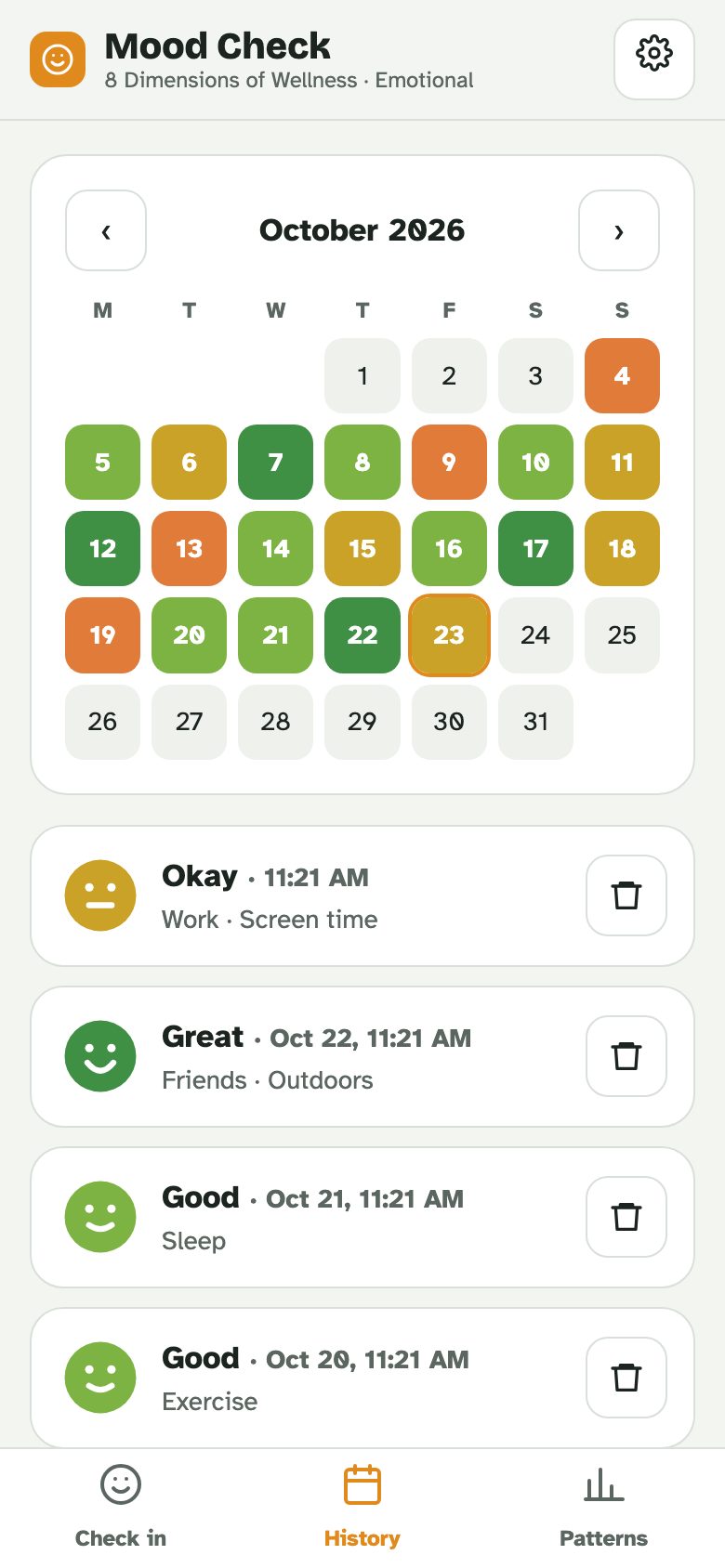
This is a month calendar where each day is colored by your average mood, red for rough days through to green for good ones. You can flip back through the months with the arrows. Underneath is every check-in from that month with its tags and notes.
I'd glance at it once a week. It's surprisingly easy to remember a month as "awful" when the calendar shows it was mostly fine with two bad stretches.
Patterns
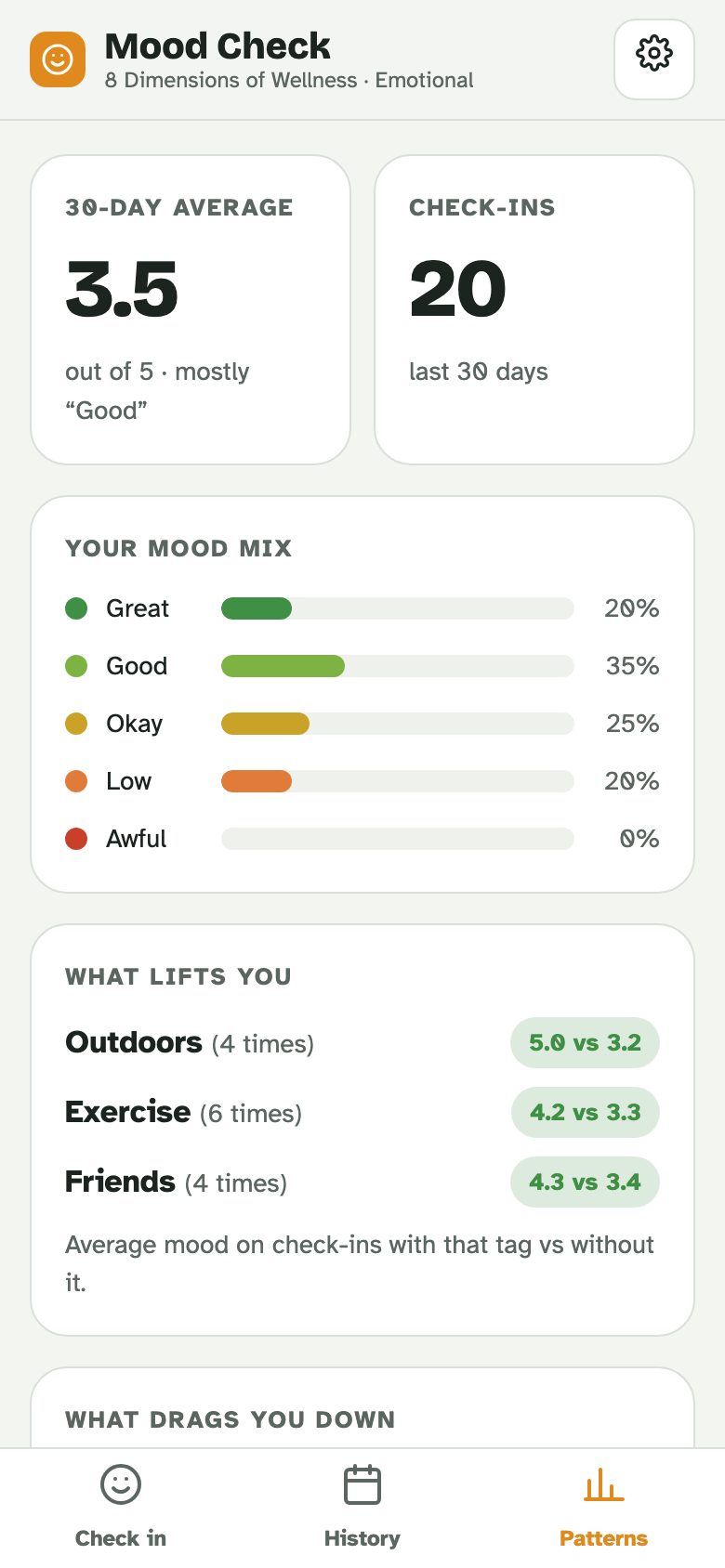
The Patterns screen does the math for you. You get your 30-day average, how many check-ins you've done and a bar chart of your mood mix. Then come the two lists I think are worth the price of admission (which is zero, so that's a low bar).
What lifts you shows the tags where your mood averages higher than on days without them, and What drags you down shows the opposite. Each tag needs at least three uses before it shows up, so give it a week or two. There's also a day-of-the-week strip that'll tell you if Sundays really are the problem.
These are clues and not a diagnosis. If exercise shows up as a lift, that's worth noticing, but the app can't tell you whether the walk improved your mood or whether you only walk on days you already feel good.
Setting a daily reminder
On the Check in screen there's a Daily reminder box with a time (8 PM to start with). Set it to whenever you're most likely to have a quiet minute, then tap Add.
You'll get two options. One downloads a calendar file that works with iPhone Calendar, Samsung Calendar and Outlook. The other is a link that opens Google Calendar with a daily repeating event ready to save. Either way, your phone's calendar handles the reminder, so it shows up even when the app is closed.
Your check-ins stay private
There's no login, no email and no cloud account. Your moods, tags and notes are stored on your phone and nowhere else, and we can't see them. For something this personal, I'd argue that's the only sensible way to build it.
The flip side is that clearing your browser data or deleting the app wipes your history. Tap the gear icon now and then and hit Save backup, which gives you a small file to stash in your Files app or Google Drive. Restore brings it back on a new phone.
Tips to get real value out of it
Check in at the same time each day, hooked onto something you already do, like brushing your teeth or plugging in your phone at night. Consistency matters more than detail here.
Be honest with the faces. If every day is "Okay", the patterns won't show you much. Nobody's grading you, so why not call a lousy day lousy?
Use tags generously. The more you tag, the sooner the lifts and drags start to mean something. Sleep and screen time are worth tagging even on good days.
If one line of notes keeps turning into a paragraph, that's a sign you might enjoy proper journaling for self-reflection on the side. The app is built for the quick version and a notebook is better for the long one.
When you notice a rough patch building, have a plan B ready. A couple of minutes of box breathing is my go-to suggestion for a wound-up evening, and it costs nothing.
When to talk to someone
Mood Check is a tracking tool and not treatment. If you've felt low most days for two weeks or more, lost interest in things you usually enjoy, or your sleep and appetite have gone off the rails, talk to your doctor. Your History calendar is actually handy for that conversation, since it shows the pattern at a glance.
If you're in crisis or thinking about harming yourself, call or text 988 in the US to reach the Suicide and Crisis Lifeline any time, day or night. In an emergency, call 911.
Frequently asked questions about Mood Check
Is Mood Check free?
Yes, completely. No price, no ads and no sign-up. It's one of eight free wellness apps we've built, one for each dimension of wellness.
Can anyone else see my moods?
No. Everything stays on your phone. There's no account and nothing gets sent to us or anyone else.
How long until I see patterns?
The mood mix shows up right away. The lifts and drags need each tag used at least three times, so most people see something useful after one to two weeks of daily check-ins.
Can I check in more than once a day?
Yes. Check in as often as you like, and the calendar colors each day by your average.
Does a mood tracker replace therapy?
No. It's a self-awareness tool. If your mood is getting in the way of daily life, a doctor or therapist is the right next step, and your tracker history can help that first conversation.
How you feel is one spoke of the wellness wheel, and the free wellness wheel quiz shows how all eight of your dimensions are doing.
Sources
- Princeton University (Lieberman et al.). Putting feelings into words: affect labeling disrupts amygdala activity (2007).
We check facts against these sources when we write or update a guide. Spotted something out of date? Email info@8dofwellness.com.


